

TLDR
The top 10 Bitcoin mining software lets you mine Bitcoin to make money. They include:
- Kryptex
- CGMiner
- Awesome Miner
- BFG Miner
- EasyMiner
- Cudo Miner
- NiceHash Miner
- MultiMiner
- Ecos
- Honey Miner
Best Bitcoin Mining Software
Skeptics might consider Bitcoin dead, and bears are always on their toes too short of it. Yet, the king of crypto is very much alive, and people are profiting from it globally. It could be by trading, lending, or even mining Bitcoin.
Mining, you say? Yes, you can profit from mining Bitcoin with the right tools. In March 2023, a miner earned 6.25 bitcoin, about $167,000.
So, what do you need to get your hands on this cool cash to earn some passive income? You need two main things: electricity and Bitcoin mining hardware and software.
But first, let’s understand Bitcoin mining.

What is Bitcoin Mining?
Bitcoin mining validates transactions and adds them to a distributed digital ledger (DLT). Each miner in the Bitcoin network owns a copy of DLT, containing the entire history of Bitcoin.
Miners use the proof of work (PoW) consensus mechanism. This ensures that only authentic transactions enter the DLT. Plus, PoW sees miners deploy their computers to solve complex math operations.
It’s like a class where students try to answer a question. In Bitcoin, whoever (miners) gets this “question” right is rewarded. The rewards are fees for processing the transaction.
So, when you see a transaction fee, you know it belongs to miners. If you want to become one of them, you need mining equipment.
In Bitcoin’s early days, your PC CPU could mine on the network. But Bitcoin has grown, and you need powerful computers to stand a chance to mine Bitcoin.
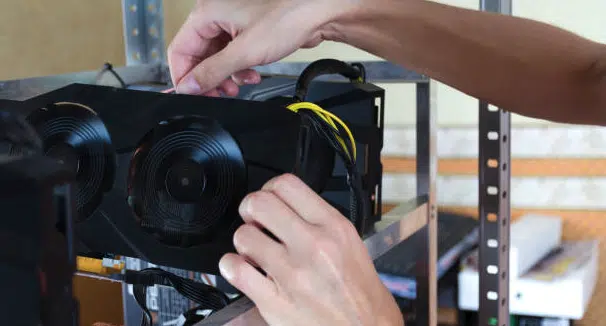
Miners merge their hardware resources, forming a mining rig to mine Bitcoin efficiently. Can your desktop or PC work without software? No.
In comparison, Bitcoin miners need software to run their hardware. This leads us to the mining software.
What is Bitcoin mining software?
Bitcoin mining software is a computer program for running the bitcoin technology. It’s useful for mining operations, like confirming and storing transactions on a ledger.
Different Bitcoin and mining algorithms and software are available, each with pros and cons. Let’s dig into the top Bitcoin mining software.
The Top 10 Best Bitcoin Mining Software
Here’s a list of the top 10 best Bitcoin mining software available:
1. Kryptex

Users seeking a simple mining process should consider Kryptex. The free Bitcoin mining software has a straightforward account setup. Plus, you can run Kryptex in the background while earning rewards.



More details
Kryptex is a great mining software for crypto miners who have little or no experience to start mining cryptocurrency and withdraw bitcoins. Although it can give consistent money, Kryptex deals with payment issues and sometimes has software bugs.
-

Easy to use.
-
Automated optimization.
-
Multiple cryptocurrency mining.
-
Low withdrawal fees.

-

High system requirements.
-
Lack of in-person support.
-
Not compatible with many devices.

Payouts are available in your local currency or Bitcoin. Additionally, it requires a BTC or fiat withdrawal fee. You can monitor the most profitable coin and switch to mining it with Kryptex.
- Pros: It supports different payout methods. The app automatically runs in the background and allows you to mine multiple cryptos.
- Cons: The fiat withdrawal fee is considerably high. It functions only on Windows.
2. CGMiner

Con Kolivas developed the CG Miner in 2011, making it one of the oldest Bitcoin mining software. Users also deploy it to mine other cryptos like Litecoin and Dogecoin. It runs on a command line, best suited for experienced miners.
CGMiner also allows users to control their hardware remotely. For instance, you can adjust the fan speed and check the mining operation. The software is cross-platform compatible, running on OS like Windows, Mac, and Linux. Miners can run it on application-specific integrated circuits (ASIC), GPUs, CPUs, and FPGAs.
- Pros: CGMiner is free, open-source, and available on GitHub. This means you can verify its code source. Also, its cross-compatibility makes it ready for use on different hardware and OS.
- Cons: The software lacks a graphical user interface (GUI), working best with keyboard commands. This makes it not user-friendly for miners with no coding experience.
CGMiner is difficult to run on Windows due to Defender, the OS antivirus.
3. Awesome Miner

Awesome Miner is a suitable option if you need a more centralized management platform to run multiple mining activities. The software empowers large-scale mining, allowing you to track multiple mining engines in one dashboard.
For instance, you can monitor your mining rigs’ fan speeds, temperature, block rewards, and hash rate. Awesome Miner is accessible on internet browsers and runs on Linux and Windows.
Furthermore, miners can customize certain functions thanks to the pre-installed C# script on the software.
- Pros: It’s free, runs on over 50 mining engines, and works remotely. Plus, the software is accessible on smartphones, tablets, and computers.
- Cons: It’s unavailable on MacOS and might not be easy to use for newbies.
4. BFGMiner

BFGMiner, released in 2012, supports FPGA and ASIC. The application allows user to control their mining rigs remotely with customizable command keys.
Also, miners can take on additional risk by mining multiple cryptocurrencies with the BFGMiner. Written in C, the software runs on Windows, Mac, and Linux with an added installation option for Raspberry Pi.
BFGMiner is suitable for advanced users thanks to its command line interface. However, this makes it an uphill task for beginners as the software lacks GUI.
Pros: It’s free and runs on multiple platforms. It supports mining multiple cryptos.
Cons: Beginners might not easily understand its functionality.
5. EasyMiner
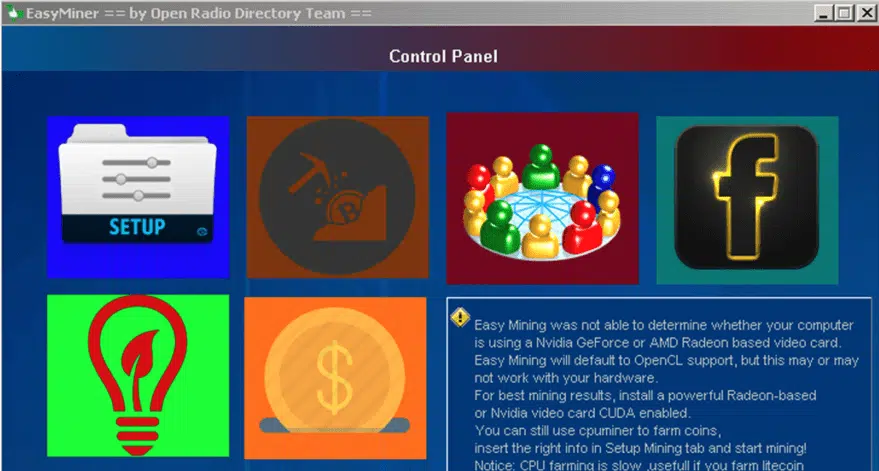
EasyMiner is an application that allows beginners to mine Bitcoin quickly and easily. It supports GUI and CPU, providing simple interfaces for mining in a few clicks.
Also, it allows users to mine Bitcoin and Litecoin simultaneously. Miners can mine Litecoin using a CPU after activating the software. EasyMiner lets you toggle between mining pools, monitor your crypto wallet, and upgrade network settings.
The app also helps to detect the optimal settings for maximizing profit.
- Pros: You can mine crypto upon activation. It’s very convenient for beginners thanks to a user-friendly interface.
- Cons: It’s only compatible with CPU and GPU mining.
6. Cudo Miner

Cudo Miner is the most popular mining software for Bitcoin and several other cryptos. Its built-in AI feature allows you to detect and switch to the most profitable crypto to mine.
Aside from Bitcoin, you can receive Monero, Ethereum, Algorand, and Cudos rewards. The software supports ASIC, GPU, CPU mining, and Mac, Linux, and Windows devices.
You can monitor hash rates and hardware stats, like temperature, wattage consumption, and transaction volume.
- Pros: It supports multiple cryptos, ASIC, CPU, and GPU.
- Cons: It requires high fees for mining, earning below 0.005 BTC monthly. It has no pre-installed crypto wallet.
7. NiceHash Miner

NiceHash is a remote cryptocurrency mining software that allows users to trade and rent computational power. The platform provides an easy setup for instant cloud mining contracts alongside a calculator to estimate profit based on initial mining costs.
Like most Bitcoin mining software, the app allows you to monitor operations on your hardware. There are two versions: the NiceHash QuickMiner and the NiceHash Miner software. The former is convenient for beginners. While the latter supports more hardware types.
Additionally, NiceHash has a crypto exchange for selling mined rewards instantly.
- Pros: It’s beginner-friendly, easy to set up, and available on mobile. It’s a Bitcoin miner app and also a cloud mining provider. This allows users to participate in BTC mining without owning computational power.
- Cons: It charges a fee, and QuickMiner only supports NVIDIA cards.
8. MultiMiner

MultiMiner is a free, open-source software developed in 2013. It uses the BFGMiner mining engine and a GUI to set up your mining rig conveniently. Its simple UI provides instructions for joining mining pools, making it easy for newbies to get on board.
Its installation requires no technical knowledge and is compatible with CPU, GPU, and ASIC hardware. Furthermore, it runs on Mac, Windows, and Linux OS. MultiMiner enables remote control for managing mining strategies.
For instance, you can switch hardware to mine the most profitable crypto or one with a simple hash puzzle.
- Pros: It supports GUI and is well-optimized for Windows.
- Cons: It requires additional software to run on Mac and Linux. It supports fewer customization features for experienced users.
9. Ecos

Ecos provides a hands-off encounter with Bitcoin mining. The platform offers mining contracts, allowing you to earn mining rewards without having computational power. How?
Ecos manages the entire cloud mining provider process. You can invest in it and use the platform’s calculator to estimate your earnings. Ecos provides cloud mining, savings, investment portfolios, wallets, and exchanges.
- Pros: It requires no hardware resources and is entirely cloud-based. Beginners can easily join the platform.
- Cons: Earnings might fluctuate depending on Bitcoin’s future price.


More details
ECOS allows individuals and businesses to participate in cryptocurrency mining without purchasing and managing their own hardware. The platform provides access to mining equipment, infrastructure, and support and maintenance services. Furthermore, it offers different crypto wallets so users can invest directly on the phone without much trouble.
However, ECOS has received mixed reviews from users. Some claimed it is a positive and reliable mining farm, while some expressed dissatisfaction with low profitability and technical issues.
-
Low withdrawals
-
Flexible mining contracts
-
ASIC miner hosting service
-
24/7 customer support
-
Limited control of mining equipment
-
Limited information about the company
-
Technical issues
10. HoneyMiner

HoneyMiner is a free cloud mining contract platform for turning hardware power into mining and hashing power. This allows you to convert your machine into a profitable mining rig.
What’s more, miners can pull resources together into a mining pool. This scales the process and the earning potential of everyone involved. The software provides rock-solid security.
This safeguards rewards awaiting withdrawals in cold storage.
- Pros: It enables you to mine GPU-friendly altcoins and provides a secure means for storing rewards.
- Cons: It might cause your computer to lag. Users might incur huge electricity costs, running the app 24/7.
How to Mine Bitcoin
Hardware, software, and electricity are three essential tools for mining Bitcoin. We’ve covered the most mining software part in-depth. Now, let’s have a quick look at Bitcoin mining hardware.
Bitcoin mining hardware is specialized machines dedicated to mining Bitcoins. Miners used CPUs in Bitcoin’s early years.
However, it is growing and requires specialized GPUs and ASIC mining hardware. You need mining software to run these machines and stable electricity to prevent downtime. Next, set up the Bitcoin software on your device and consider joining a mining pool.
This aggregates computational power from several miners, increasing your chance of mining a block and earning rewards. Popular Bitcoin mining pools are the AntPool, Slush Pool, and F2Pool.
Do you want to save the stress of setting up a rig from scratch?
Consider a Bitcoin cloud mining provider. They let you rent computational and computing power while enjoying mining fees without operating a single rig. Additionally, you need a Bitcoin wallet to collect your earnings.
Hardware and paper are go-to options for storing crypto securely. Aside from a specialized mining hardware rig, you can mine Bitcoin on PC and mobile.
How to Mine Bitcoin on Your PC
The steps for mining on a PC are similar to mining on a rig. First, download a Bitcoin wallet on your PC. You can consider cold storage or software wallets. Note: software wallets are prone to hacking.
Use them if you want to trade your coins and cash out immediately. Next, install mining software that’s compatible with your OS. Join a mining pool to maximize hardware power, solve blocks faster, and earn bigger rewards.

How to Mine on Mobile
Bitcoin or crypto mining on a smartphone is largely unprofitable. For one, mining requires high computing capacity and energy consumption. This means most smartphones will overheat and end up crashing.
However, there is a subtle way to mine Bitcoin. Note: the reward is meager and might not be worth your while. If you want to go ahead, here’s what you need to do:
- Visit your app store to download a mobile-friendly mining app. Thoroughly check the app’s review. Why? They might be unsafe or outright scams.
- Sign up on the app. You need to create an account to access a built-in wallet. Some apps might not have this and request you submit a wallet address to receive rewards.
- Perform tasks. You need to perform specific tasks like watching ads or downloading an app.
- Collect rewards. You’ll receive rewards and can withdraw them when they reach a specific threshold.
Bitcoin Mining Electricity Cost
Miners need to consider several factors to minimize the electricity cost of mining. This includes the electricity cost in your location, the hardware mining efficiency, and the size of your mining rig or pool.
For instance, it costs about $10,720 to mine one Bitcoin in the United States. This cost is comparably low, considering other regions like Germany, Denmark, and Belgium.
The price per kWh in the US is about 12.5 cents and 37.5 cents in Germany and Denmark. Also, device efficiency impacts power consumption as efficient devices take less power to solve blocks than inefficient ones.
10 Important Features of Bitcoin Mining Software
Whether you want to run a localized or cloud-based mining rig, Bitcoin mining software has several essential features. Understanding them will help you start mining profitably and maintain the process efficiently.
Let’s dig into 10 Bitcoin mining software features.
1. Live Price Ticker
It’s no news that the Bitcoin market is highly volatile. This makes miners keep an eye on the asset price. A live price ticker displays the current Bitcoin price and is active round-the-clock. This information helps miners decide when to swap their Bitcoin for altcoins or stablecoins like USDT.
2. Pool Performance
People look for banks with high saving interest rates. In comparison, miners look for mining pools with the best performance. This means they can collectively mine more blocks and earn higher returns.
Bitcoin mining software allows the option to find and join the highest-performing pools.
3. Overclocking Options
Bitcoin mining software might overclock if it operates beyond its capacity. However, you can tweak your hardware parameters to extend its limits. Also, you can upgrade it to improve performance.
This mining strategy lets miners extend their device’s limit and maximize performance to increase profit.
4. Automation
Bitcoin software lets you automate specific processes. For instance, you can switch rigs and cryptocurrencies. You can also automatically detect lags and adjust settings to work optimally.
This helps miners get more work done without expending manual labor.

5. Cloud Mining
MacroMicro says the average Bitcoin production cost is about $31,000 (as of writing). This poses a financial barrier to many beginners. Thankfully, you don’t need hardware resources to benefit from mining Bitcoin.
Cloud mining lets you access the computational power of mining pools or farms. For instance, you can stake Bitcoin in a cloud mining contract or pool to share block rewards. All the maintenance and operations of the mining rig come from the pool.
6. Multi-asset Support
There is software that supports Bitcoin and altcoin mining. This lets miners seek profitable ventures in altcoins when the BTC market is down and vice versa.
Examples of software for multi-asset mining include BFGMiner, CGMiner, and Cudos.
7. Remote Control Options
Cloud computing in crypto makes it possible to manage Bitcoin mining remotely. Is your mining rig overheating? You can increase the fan speed for lower temperatures.
Do you want to monitor performance? You can check valuable metrics like system uptime and hash rates. The various remote access control options help miners manage their mining operations without being physically present at the mining rig.
8. Profit Analysis
Whether it’s maintenance or electricity bills, mining incurs costs. Miners need to analyze costs to determine if the business is profitable.
Bitcoin mining software provides calculators to estimate mining costs. This helps miners to determine when they’re in profit or loss.
9. Bitcoin Network Statistics
Is it profitable to mine 24/7, 365 days? The answer to this lies in understanding Bitcoin network statistics. For example, a Bitcoin network might be jammed with thousands of miners when the price is high.
Waiting for a dip could be an opportunity to start mining again. Why?
The best time to mine could be in a bear market. Some miners would have incurred high costs purchasing expensive equipment during the bull run. They may sell their mining machines cheaply if they can’t sustain the business.
This is an opportunity to set up your mining rig cheaply and begin mining, as the network should be less congested with other miners.
10. Standalone Miner Capability
You don’t need a mining pool if you have the resources to mine alone. The best Bitcoin miner software now allows you to run standalone machines and still earn miners’ fees.
The benefit is that you can keep all the rewards from mining a block. However, this comes with the need for super-powerful and expensive hardware. You need this to stand a chance against gigantic mining pools/farms.
Bitcoin Mining: What’s Next?
Mining is a crucial activity that sustains the Bitcoin network. However, there are certain hurdles it might encounter moving forward. One of them is crypto taxes and regulations.
It could be difficult to estimate taxes when miners incur losses or during a bear market. Additionally, there are growing concerns about regulations around energy consumption. These could inhibit Bitcoin mining profitability.

Tech advancement enables miners to source more powerful and efficient mining tools. This could broaden decentralization, allowing more competition in the network. A third thing to consider is Bitcoin halving. We’d see the Bitcoin block reward drop from 6.25 to 3.125 BTC by April or May 2024.
Miners might increase transaction fees to compensate for a reduced block reward. Regardless, interesting events (like the halving) are on the horizon. This keeps Web3 users optimistic about the space.
Summary
The Bitcoin mining software is essential for a functional mining machine. Most of them are free, and you can operate them remotely. However, some software doesn’t offer GUIs. This makes them challenging for beginners to use.
Aside from mining software, you should consider mining hardware and electricity costs. Did you enjoy this article? Hop on to our comprehensive blog on how to make money with Bitcoin.
Most Bitcoin mining software is free. However, there are other considerable costs to becoming a miner. These include hardware, electricity, storage, and maintenance costs.
Smartphones are unsuitable for mining Bitcoin directly. The power and hardware requirements are above the everyday smartphone capacity.
You can earn rewards on a mining app by performing minimal tasks. This includes watching ads or downloading apps.
It takes about 10 minutes to mine 1 BTC. However, this depends on your hardware and software capacity. Sometimes, it might take up to 30 days to mine a BTC.
Miners get 3.125 BTC for a block. Yet, the time to mine a block varies. For instance, super-powerful miners can mine one block in 10 minutes.
The best mining program for beginners is MultiMiner. It provides a simple GUI and easy-to-use features.

Susan Oh
Susan Oh is a leading figure in the integration of AI and blockchain for social good, serving as the CMO for BeOmni by Beyond Imagination and a civic technologist dedicated to creating scalable solutions. She is a board member of the Blockchain Commission For Sustainable Development supported by the UN GA Office of Partnerships, and a member of the Global Sustainability Network, a joint initiative by the Vatican and the Church of England to combat human trafficking. Recognized with the...